Understanding HTML Tags and Elements

What HTML is and why we use it
HTML is the basic building block of every website on the internet. Whenever we open a webpage, the browser reads HTML to understand what content should appear and how that content is structured. HTML does not focus on how a website looks or behaves, but on what each part of the page is.
We use HTML to give meaning and structure to web content. It tells the browser which text is a heading, which text is a paragraph, where an image should appear, and which text should work as a link or a button. Without HTML, the browser would see everything as plain text with no clear organization.
You can think of HTML as the skeleton of a webpage. Just like a skeleton gives shape to the human body, HTML gives structure to a webpage. CSS is then used to make the page look good, and JavaScript is used to add interaction, but HTML always comes first.
To create this structure, HTML uses something called tags, which we will understand next.
What an HTML tag
An HTML tag is used to tell the browser what type of content it is reading. Tags act like labels or instructions that wrap around content and explain its purpose. For example, a browser does not automatically know whether a piece of text is a heading or a paragraph—HTML tags make this clear.
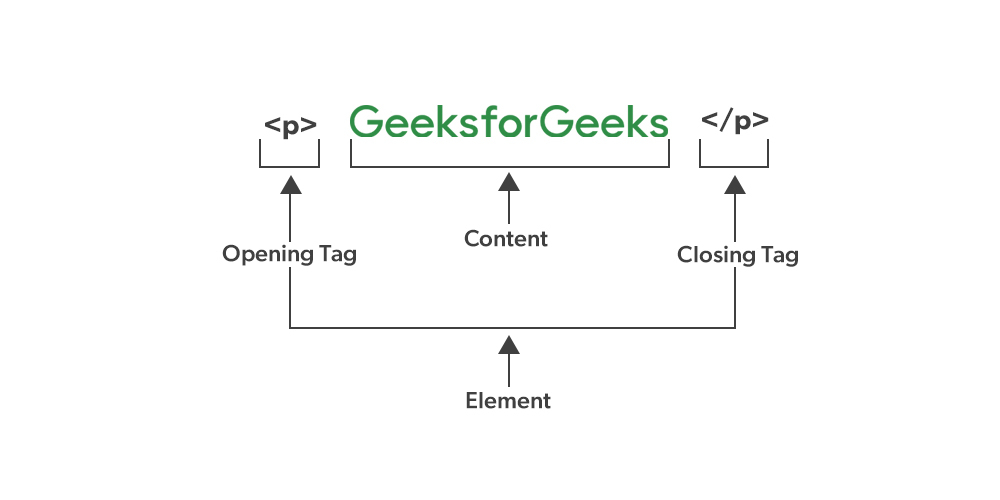
Most HTML tags are written inside angle brackets and usually come in pairs. The opening tag marks where the content starts, and the closing tag marks where the content ends. Everything written between these two tags is treated as a single unit by the browser.
You can think of an HTML tag like a label on a box. The label tells you what is inside the box, and the browser uses that label to decide how to display the content.
Paragraph (p)
The p tag is used to write normal text content on a webpage.
<p>This is a paragraph of text.</p>
Heading (h1)
The h1 tag is used for the main heading of a webpage.
<h1>Welcome to My Website</h1>
Division (div)
The div tag is a container used to group multiple elements together.
<div>
<p>This text is inside a div.</p>
</div>
Span (span)
The span tag is used to group small pieces of text, usually within a line.
<p>This is a<span>highlighted</span> word.</p>
These examples show how HTML tags help define what each part of the content is, so the browser can display it correctly.
What an HTML element means
An HTML element is the complete structure that the browser understands. It includes the opening tag, the content, and the closing tag together. While a tag is only the label, an element is the full unit that creates meaning on a webpage.
For example:
<p>This is a paragraph.</p>
Here, <p> and </p> are HTML tags, and everything together—including the text inside—is called an HTML element. In simple words, a tag is a part, but an element is the whole thing.
Self-closing (void) elements
Some HTML elements do not contain any content, so they do not need a closing tag. These are called self-closing or void elements. They are used to insert things like line breaks, images, or input fields on a webpage.
Common examples include:
<br>
<img>
<input>
These elements work by themselves because there is nothing to write inside them. The browser understands their purpose as soon as it sees the tag.
Block-level vs inline elements
HTML elements are mainly divided into block-level and inline elements based on how they appear on the page.
Block-level elements always start on a new line and take up the full width of the page.
- Examples include
div,p, andh1.
Inline elements stay within the same line and only take up as much space as needed.
- Examples include
span,a, andstrong.
You can think of block-level elements like writing on a new line in a notebook, while inline elements are like words in the same sentence.
Commonly used HTML tags
Below are some of the most commonly used HTML tags that beginners should know:
h1– Used for the main headingp– Used for paragraphsdiv– Used to group elements togetherspan– Used for small pieces of texta– Used to create linksimg– Used to display imagesul– Used for unordered listsli– Used for list items
These tags form the foundation of most webpages, and you will see them used again and again as you continue learning HTML.


