TCP vs UDP: When to Use What, and How TCP Relates to HTTP

Before anything can work on the internet, one basic problem must be solved: How do we send data from one computer to another—correctly and on time?
The internet is made up of millions of devices connected across different networks. Data doesn’t travel as one big piece; it’s broken into small packets and sent through many paths. Along the way, packets can get lost, delayed, duplicated, or arrive out of order.
Without rules, this would be complete chaos.
That’s why the internet needs clear rules—called protocols—that decide:
how data is sent
how fast it is sent
what happens if data is lost
and how the receiver understands what arrived
Different rules exist for different needs. Some prioritize accuracy, some prioritize speed. This is where protocols like TCP and UDP come in—they are the basic rules that make reliable and real-time communication on the internet possible.
What are TCP and UDP Protocol
Internet traffic is composed of data transfers — lots of them — between servers and devices. That data is transferred via two protocols: TCP and UDP.
TCP (Transmission Control Protocol) is the safe and reliable option. It makes sure data is delivered completely, in the correct order, and without errors. If something is lost on the way, TCP notices and sends it again. Think of TCP like a courier service that tracks your package and confirms delivery.
UDP (User Datagram Protocol) is the fast but risky option. It sends data without checking whether it arrived or in what order. There are no retries, which makes it much faster, but less reliable. Think of UDP like a live announcement—if you miss a part, it’s gone, but everything happens in real time.
In short: TCP = reliable but slower UDP = fast but unreliable
Key differences between TCP and UDP
Each protocol has its advantages and drawbacks, and users can leverage them to improve their browsing experience. Learn about the differences between the TCP and UDP protocols and how each protocol transmits data.
| Factor | TCP | UDP |
| Connection type | Requires an established connection before transmitting data | No connection is needed to start and end a data transfer |
| Data sequence | Can sequence data (send in a specific order) | Cannot sequence or arrange data |
| Data retransmission | Can retransmit data if packets fail to arrive | No data retransmitting. Lost data can’t be retrieved |
| Delivery | Delivery is guaranteed | Delivery is not guaranteed |
| Check for errors | Thorough error-checking guarantees data arrives in its intended state | Minimal error-checking covers the basics but may not prevent all errors |
| Broadcasting | Not supported | Supported |
| Speed | Slow, but complete data delivery | Fast, but at risk of incomplete data delivery |
| Usage | Web browsing, email (SMTP/POP3) | VoIP, streaming, gaming |
When to use TCP
Use TCP when data accuracy and reliability are more important than speed. In simple terms, choose TCP when every piece of data must arrive correctly and in order.

When TCP Is the Right Choice :
❗ Data loss is unacceptable
🔁 Missing data must be re-sent
📦 Information must stay in the correct order
Common Examples
🌐 Websites (page loading, form submission)
📧 Emails
📁 File downloads and uploads
💳 Online payments and banking
📄 APIs and backend services
If even a small part of the data goes missing, these systems can break or show wrong results—that’s why they rely on TCP. If correctness matters more than speed, use TCP. That single rule will help you choose TCP in most real-world cases.
When to use UDP
Use UDP when speed and real-time delivery are more important than perfect accuracy. In simple terms, choose UDP when it’s okay to lose some data, but not okay to wait.

When UDP Is the Right Choice
⚡ Low latency is critical
⏱️ Data must arrive immediately
❌ No time for re-sending lost data
👂 Small losses are hardly noticeable
Common Examples
🎥 Live video streaming
🎮 Online gaming
📞 Voice and video calls
📡 Live broadcasts
🛰️ DNS queries
If one small packet is lost, the application simply moves on instead of slowing everything down to fix it. If speed matters more than accuracy, use UDP. That’s the core idea behind why UDP exists.
What is HTTP and where it fits
The Hypertext Transfer Protocol (HTTP) is the foundation of the World Wide Web, and is used to load webpages using hypertext links. An HTTP request is the way Internet communications platforms such as web browsers ask for the information they need to load a website.
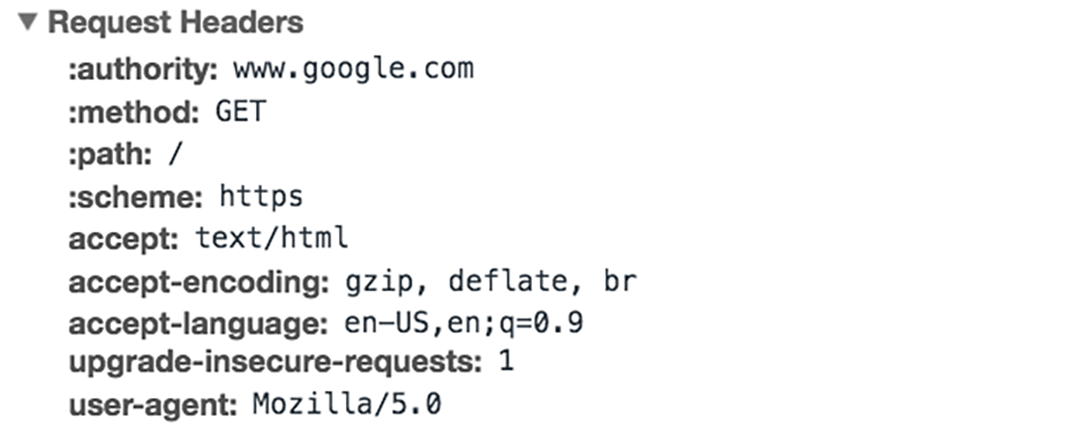
Each HTTP request made across the Internet carries with it a series of encoded data that carries different types of information. A typical HTTP request contains:
HTTP version type
a URL
an HTTP method
HTTP request headers
Relationship between TCP and HTTP
TCP (Transmission Control Protocol) and HTTP (HyperText Transfer Protocol) work together in a layered model, where HTTP acts as an application-layer protocol running on top of the transport-layer protocol, TCP.
Key Relationship Aspects:
Layering: TCP operates in the Transport layer (ensuring data delivery), while HTTP operates in the Application layer (structuring data).
Dependency: HTTP relies on TCP for data transmission. Before any HTTP request (GET/POST) is sent, a TCP connection must be established via a handshake.
Reliability: TCP ensures that packets are delivered correctly, in order, and without loss, which is crucial for the web content delivered by HTTP.
Function: TCP manages the "pipe" (connection) between client and server, while HTTP uses that pipe to exchange actual data, such as HTML documents, images, or API data.
Usage: While TCP handles the connection, HTTP works at a higher level of abstraction, acting as the foundation for web communication.


