CSS Selectors 101: Targeting Elements with Precision

Why CSS Selectors Are Needed
CSS is all about styling HTML, but HTML pages can have hundreds of elements—headings, paragraphs, buttons, images, sections, and more. So the big question is: How does CSS know which element to style?
That’s where CSS selectors come in. Selectors are simply ways to choose HTML elements so styles can be applied to the right ones.
Selectors Explained with a Real-World Analogy
Think of an office building 🏢:
Calling “Everyone!” → targets all people
Calling “Developers!” → targets a group
Calling “Rahul!” → targets one specific person
CSS works the same way:
Element selector → everyone of that type
Class selector → a group
ID selector → one unique element
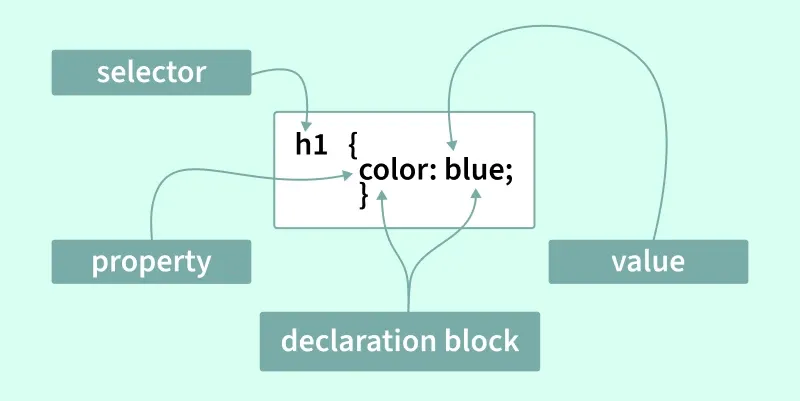
1. Element Selector (Most Basic)
An element selector selects all HTML elements of the same type.
Example
p {
color: blue;
}
What it does
Selects ALL
<p>elementsMakes every paragraph blue
HTML
<p>This is paragraph one</p>
<p>This is paragraph two</p>
2. Class Selector (Most Common)
A class selector targets a group of elements you choose.
Syntax
.class-name {
  property: value;
}
Example
.highlight {
background-color: yellow;
}
HTML
<pclass="highlight">Important paragraph</p>
<p>Normal paragraph</p>
Why classes are powerful
Can be reused
Can be applied to different elements
Most commonly used in real projects
Flexible
Reusable
Preferred over IDs most of the time
3. ID Selector (Very Specific)
An ID selector targets one unique element.
Syntax
#id-name {
  property: value;
}
Example
#main-title {
font-size:32px;
}
HTML
<h1id="main-title">Welcome</h1>
Important rules
IDs must be unique
One ID = one element
Use sparingly
Too many IDs make CSS hard to manage
4. Group Selector
A group selector lets you apply the same style to multiple selectors at once.
Example
h1,h2,p {
font-family: Arial;
}
What it does
Styles all
<h1>,<h2>, and<p>elements togetherAvoids repeated CSS
Saves time
Keeps CSS clean
5. Descendant Selector
A descendant selector styles elements inside another element.
Example
divp {
color: green;
}
HTML
<div>
<p>This will be green</p>
</div>

<p>This will NOT be green</p>
Meaning
- Targets
<p>only if it’s inside a<div>
Think of it as:
“Style p that lives inside div”
More control
Very common in layouts
6. Basic Selector Priority (High-Level Overview)
Sometimes multiple selectors target the same element. CSS then follows a priority order.
From lowest to highest priority:
Element selector
Class selector
ID selector
Example
p {
color: blue;
}

.text {
color: red;
}

#special {
color: green;
}
<pclass="text"id="special">Hello</p>
Final color? Green (ID wins) - This is called CSS specificity


